App Store payouts, consulting invoices, and side project revenue don't fit neatly into any budget template. Balance Pro gives indie developers one place to track every income stream, every recurring tool cost, and every deductible expense — so your finances are organized all year, not just before April 15.
Consumer budgeting apps assume a single employer, a steady paycheck, and a simple spending life. Indie developers run a small business, earn from multiple sources, and pay for a dozen tools a month — none of which fits that model.
App Store payout one week. Consulting invoice the next. An affiliate commission after that. Each source arrives on a different schedule, in a different amount, with different tax implications. Lumping it all into a single "Income" line tells you nothing useful about how your business is actually performing — or which revenue stream is worth doubling down on.
AWS, GitHub, Netlify, Figma, Notion, domain renewals, API access fees, Apple and Google developer accounts — individually each line item feels trivial. Together they might be costing you $200 to $400 a month without you having a clear picture of the total. Until you see the full number in one place, you can't make informed decisions about which tools are earning their keep.
You bought that mechanical keyboard on your personal Visa. The Figma subscription billed your business Mastercard. The cloud server charge is somewhere in between. When tax season arrives, untangling six months of mixed transactions takes time you don't have — and you probably miss deductible expenses in the process, costing you real money every April.
Without tracking income and expenses by source, you can't tell whether your consulting practice is profitable, whether your app is covering its own hosting costs, or whether the whole indie operation is moving forward or just treading water. Cash flow visibility isn't a nice-to-have — it's the only way to make good decisions about where to spend your limited time and money.
Every feature in Balance Pro was designed with financial complexity in mind. Here's how it handles the four biggest financial challenges indie developers face.
Create custom income categories for each source — "App Store," "Consulting," "Contract Work," "Affiliate" — and tag income as it arrives. Balance Pro's reporting lets you filter by category and date range so you can see exactly how each stream contributes month over month, and whether the mix is shifting in your favor.
With the Ultra plan, bank sync via Plaid imports transactions automatically from all connected accounts. On Premium, logging a payment takes about ten seconds. Either way, you always know your true income position across every source, not just whatever hit your main checking account this week.
Add every recurring cost to Balance Pro's bills and subscriptions tracker — AWS, GitHub, Netlify, Figma, domain renewals, API access, Apple Developer, Google Play — with due dates and monthly amounts. You get reminders before anything bills, and a running total so you always know exactly what your tool stack costs per month.
Most indie developers who do this audit for the first time find at least one subscription they'd forgotten about. Seeing the real total in one place also makes it easier to spot which tools deliver value and which ones are just a quiet drain. Clarity on costs is the first step to improving margins.
Connect your business checking, personal checking, credit cards, and savings accounts all in one place. Balance Pro shows every account in a single dashboard so you can see the full picture — what the business holds, what you hold personally, and how your net worth is trending — without logging into four different bank portals.
Use custom expense categories to flag deductible business costs the moment they hit. Home office, software subscriptions, equipment, professional services, developer accounts — tag them as they occur rather than reconstructing everything from statements in April. When you need a year-end export, it takes about two minutes.
The Ultra plan includes AI receipt scanning powered by Google Gemini. Snap a photo of any business receipt — a conference ticket, a hardware purchase, a coworking day pass — and Balance Pro automatically captures the merchant, amount, and date. Receipts are stored with the transaction and accepted by the IRS for tax purposes.
At year end, filter your transactions by deduction category, export to CSV, and hand it directly to your accountant. No statement archaeology. No reconstructing which Amazon order was a business purchase. Just a clean, organized export with every deductible expense already labeled and ready to use.
Whether you ship iOS apps, bootstrap a SaaS tool, or split your week between consulting and building, the financial challenge is the same: you run a business without wanting to spend your evenings on bookkeeping.
Alex ships two apps and takes iOS consulting contracts to cover his fixed costs while his apps grow. His App Store revenue ranges from $400 to $1,800 a month depending on the season. Consulting contracts land irregularly. Without visibility across both streams, he was constantly surprised by slow months and had no way to know which revenue source was growing.
Alex set up separate income categories for "App Store" and "Consulting" and connected both his business and personal accounts. Now he can see at a glance how each stream is trending month over month — and know immediately whether a slow app month means he should pick up a consulting contract or whether his runway is comfortable.
Sam is bootstrapping a developer tool with $680/month in MRR. She pays for Vercel, Railway, Supabase, GitHub, Figma, and half a dozen other tools — each billed separately, several annually. She suspected her tool costs were eating more margin than she realized, but couldn't see the full number without manually adding everything up each month.
Sam added every tool subscription to Balance Pro's bills tracker. In five minutes, she saw her total monthly tool cost: $247. That number made two forgotten subscriptions obvious — tools she'd signed up for during a trial that were still billing. She cancelled both on the spot and cut her monthly overhead by $38 without touching anything she actually uses.
Marcus consults four days a week and spends Fridays building a side project. He pays for tools with both personal and business credit cards, and his income comes from both consulting and early product revenue. At tax time, his accountant spent the better part of a day untangling mixed transactions — time billed at $200/hour.
Marcus connected both accounts to Balance Pro and created categories for hardware, software, home office, and professional services. Now he tags business purchases as they happen — a two-second tap. His accountant's prep time dropped from a full day to under two hours, saving him over $400 in CPA fees in the first year alone.
You have three realistic options for managing your indie developer finances. Here's an honest look at what each one costs you in money, time, and clarity.
At $99.99/year, Balance Pro Ultra costs less than one month of QuickBooks — and it's designed for how indie developers actually work. Get started today.
Consumer budgeting apps were built for people with one employer, two bank accounts, and relatively predictable monthly income. The dominant frameworks — 50/30/20 budgeting, envelope budgeting, zero-based budgeting — all depend on knowing what your income will be before the month starts. For indie developers, that assumption breaks down on day one.
The indie developer's financial life is fundamentally more complex. You earn from the App Store on a monthly payout schedule that varies with downloads, subscriptions, and store featuring. You bill consulting clients on invoices with net-30 terms, meaning the money for work done this month may arrive next month. You have a side project that earns $80 in one month and $400 in the next. And you operate across the personal/business line constantly — using personal hardware for business work, paying business subscriptions from personal accounts, and generally blurring categories that standard apps keep strictly separate.
A budget app designed for indie developers doesn't just track where money went. It helps you understand your income mix, see your true business costs, and prepare for taxes — all while staying simple enough that you actually use it.
Many solo developers leave money on the table at tax time simply because they never tracked deductible expenses throughout the year. Reconstructing twelve months of statements in April is painful and error-prone — most people give up and only claim the obvious ones. Here's what's commonly missed:
The key is tracking these throughout the year rather than trying to reconstruct them in April. Balance Pro's custom categories and receipt scanning make it practical to tag deductible expenses as they happen — a two-second step at the time of purchase that saves hours at year end.
Getting organized takes about 20 minutes. Here's the setup most indie developers use:
After 30 days you'll have a clear baseline. After 90 days you'll have enough data to see patterns: which income sources are growing, which tool subscriptions are worth keeping, and whether your net position is improving month over month.
App Store and Google Play revenue is notoriously lumpy. A feature from Apple can 10× your download numbers for two weeks and then return to baseline. A competitor update can suppress your search ranking. A new iOS release can either boost your app's performance or break a critical feature. None of this is predictable on a month-to-month basis, which makes budgeting with app revenue especially challenging.
The most effective approach most indie developers use is a version of the baseline income method: identify your lowest revenue month in the past year across all income sources combined, and build your fixed expense budget around that floor. Every dollar above the baseline goes toward savings, tax reserves, and reinvestment in the business. This guarantees your personal expenses are always covered regardless of whether it's a good app month or a slow one.
Balance Pro's cash flow tracking makes this practical. The dashboard shows your actual income and expenses for any period, so you can identify your true floor and set your budget accordingly. The net worth tracking feature adds another layer of visibility: even in slow months, you can see whether your overall financial position is moving in the right direction.
For indie developers who also consult, a useful rule of thumb is to use consulting income to cover living expenses and treat app revenue as investment capital — money that goes back into the product or into savings, not into the monthly budget. Balance Pro's custom categories make it easy to implement this mental separation even when the money flows through the same bank accounts.
Yes. Create custom income categories for each revenue stream — "App Store," "Consulting," "Contract Work," "Affiliate" — and tag income as it arrives. Balance Pro's reporting lets you filter by category and date range to see how each source contributes to your total income over time.
Yes. Balance Pro's bills and subscriptions tracker lets you add every recurring cost — AWS, GitHub, Netlify, Figma, domain renewals, API access, Apple Developer account, Google Play account — with due dates and monthly amounts. You'll see your full tool stack total in one view and get reminders before anything bills.
Connect both your business and personal accounts to Balance Pro. You can track them side by side in the same dashboard, use custom categories to tag business expenses as they occur, and filter your transaction history by account or category at any time. At year end, your deductible expenses are already organized and ready to export.
Yes. The Ultra plan includes AI receipt scanning powered by Google Gemini. Snap a photo of any business receipt and Balance Pro automatically captures the merchant name, amount, and date. Receipts are stored with the transaction and accepted by the IRS and Canada Revenue Service for tax and audit purposes.
Balance Pro Premium is $47.99/year and includes manual transaction tracking, unlimited accounts and budgets, custom categories, receipt photo uploads, and CSV export. Balance Pro Ultra is $99.99/year and adds automatic bank sync via Plaid, automatic transaction categorization, and AI receipt scanning. Both plans are available on iOS, Android, and web.
Balance Pro is a personal finance and budgeting app, not accounting software. It doesn't handle invoicing, payroll, or double-entry bookkeeping. What it does — cash flow visibility, income categorization, bills tracking, savings goals, and expense management — it does extremely well and at a significantly lower price point. Most indie developers use Balance Pro alongside a lightweight invoicing tool: Balance Pro for daily financial awareness, and a separate tool for sending invoices to clients.
Yes. Balance Pro is available on iOS, Android, and web. You can log a payment the moment it arrives from your phone, or review your full financial picture on a desktop browser while you work. All data syncs in real time across devices, so your numbers are always current wherever you check them.
Balance Pro Premium ($47.99/year) covers manual tracking, custom categories, and CSV export — everything you need to stay organized. Upgrade to Ultra ($99.99/year) to add automatic bank sync, AI receipt scanning, and automatic transaction categorization. Either way, most indie developers find it pays for itself quickly in saved accounting fees and deductions they'd otherwise miss.
Stop guessing and start knowing. Balance Pro gives indie developers the financial clarity to build confidently, track every revenue stream, and spend without anxiety — even when income varies month to month.
Get Started Today

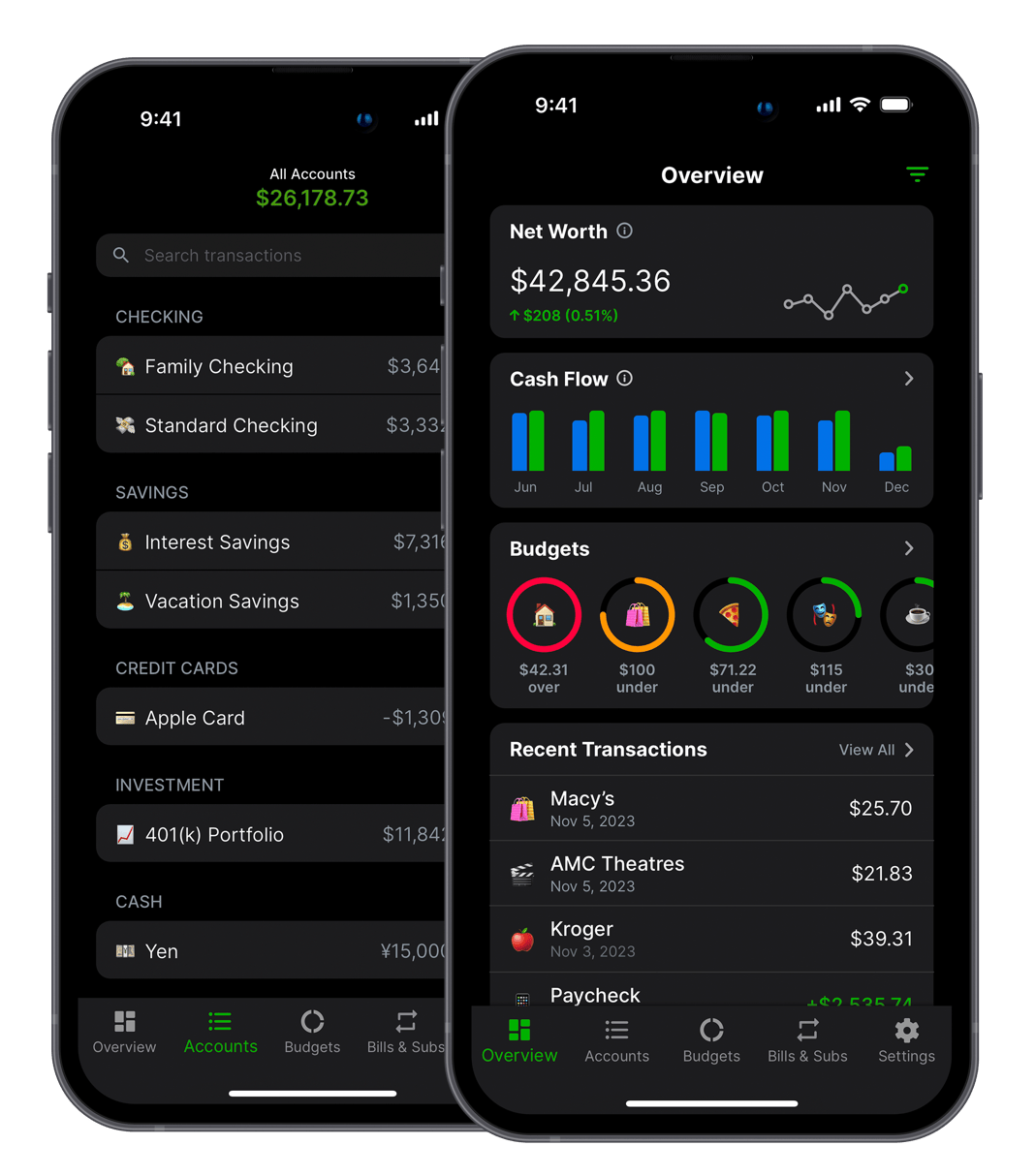

Balance Pro is a budgeting and personal finance app that helps you manage and optimize your money. Built by Jordan Kennedy in Nashville.
Download


Also from this developer

GrowthMap
GrowthMap is a tool that generates actionable growth reports for indie developers and solo founders.

Limelight
Never wonder what to watch again. Discover, track, and enjoy the best movies and shows.

Trivia Party
Trivia Party is a quiz game with over 12,000 questions across a variety of fun categories.
