Most budgeting apps assume you get paid the same amount on the same day every two weeks. You don't. Balance Pro flexes with variable income, helps you set aside quarterly taxes automatically, and keeps your business and personal money separate.
Standard budgeting apps are designed around one employer, one paycheck, and a predictable monthly income. For freelancers, that model breaks down almost immediately.
A $4,000 month followed by a $900 month is normal when you freelance. Apps that tell you to "budget 50% of your income for needs" don't help when you don't know what your income will be. You need a system that works with reality, not an idealized version of it.
You might receive payments from several sources in a single week: retainer fees, project invoices, referral bonuses, each on different schedules for different types of work. Lumping it all into one "Income" line makes it hard to understand your income mix or whether a new revenue stream is actually contributing meaningfully.
No employer withholds taxes for you. Miss a quarterly estimated payment to the IRS and you face penalties on top of what you already owe. Without a system that automatically sets money aside as income arrives, tax time becomes a scramble to find cash you should have been saving all along.
You buy a laptop on your personal card. You pay for client software out of your business account. When tax season arrives, you're digging through months of mixed transactions trying to figure out what's deductible. That costs you hours, and probably money, every April.
Every feature in Balance Pro was designed with financial flexibility in mind. Here's how it handles the four biggest challenges freelancers face.
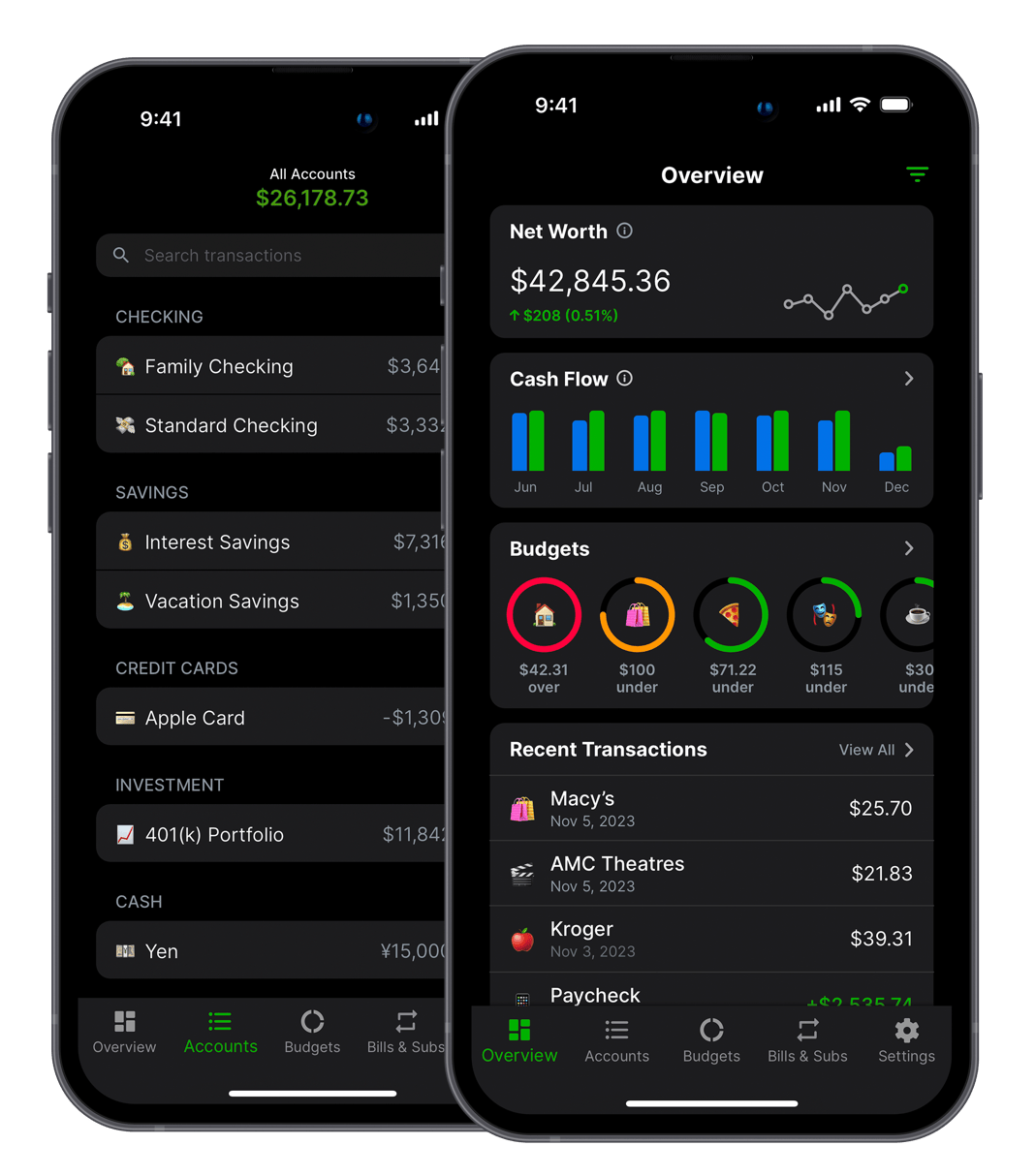
Connect your checking, savings, and business accounts to see every dollar in one place. Balance Pro automatically imports transactions and lets you track your real cash position across all accounts simultaneously. When a client pays you, it shows up immediately, with no manual entry required.
Use customizable income categories to separate different revenue streams. See at a glance whether you're on track for the month or need to pick up more work before bills are due. The dashboard gives you the honest picture, even when income is lumpy.
Balance Pro brings all your accounts together into a single dashboard: checking, savings, credit cards and business accounts side by side. Create custom categories for every type of income and expense, then filter your transaction history by category or date range to see exactly where money is coming from and where it's going.
For freelancers, this visibility is the difference between reactive money management and actual financial control. Instead of checking your bank balance before every purchase, you can see your real net position, with income in, expenses out and taxes reserved, and know with confidence how much is genuinely yours to spend.
Set up a savings goal for your quarterly tax estimate, either a fixed dollar amount or a percentage of every payment you receive. Balance Pro tracks your progress toward the goal and shows you exactly how much you've saved versus how much you'll owe on your next quarterly due date.
Never get blindsided again. When April 15th, June 16th, September 15th, or January 15th rolls around, you'll know you have the money ready. The tax set-aside feature works the same way for state taxes, self-employment tax, and any other variable you need to plan for.
Balance Pro lets you create custom expense categories that map to common freelance deductions: home office, professional development, software subscriptions, equipment, travel, and professional services. Tag transactions as they happen instead of reconstructing everything from scratch in April.
Connect both your personal and business accounts and use Balance Pro's multi-account view to keep them organized without mixing them up. When you need a year-end summary of deductible expenses, you can export your transaction history in CSV format and hand it directly to your accountant. No spreadsheet archaeology required.
Whether you're a designer, developer, writer, or consultant, the challenge is the same: running your finances like a business, not an afterthought.
Maria works with four clients on retainer and picks up occasional project work. Her monthly income ranges from $3,500 to $7,000 depending on project volume. She was consistently short on taxes because she'd spend money from her checking account without knowing how much she'd already committed to the IRS.
Maria created a "Tax Reserve" savings goal set to 28% of every income transaction. Balance Pro now shows her a live running total of what she owes alongside her normal balance. She stopped dreading tax season because the money is always already there.
Daniel runs his freelance business through a dedicated LLC with a separate business bank account, but he also uses his personal credit card for equipment and subscriptions. At tax time, figuring out which charges were business-related took him two full days of statement review every year.
Daniel connected both his personal and business accounts to Balance Pro and created categories for each deduction type. Now he tags expenses in seconds as they happen. At year end, he filters by category, exports to CSV, and emails it to his CPA in under five minutes.
Sofia's income ranges from $2,500 to $8,000 per month depending on project timing. Strong months, she'd spend freely. Slow months, she'd scramble to cover basics. She knew she needed a buffer but never felt like she had "extra" money to set aside, because without clear visibility, every dollar felt already spoken for.
Sofia set up a "Buffer Fund" savings goal in Balance Pro targeted at three months of core expenses. Every time income arrived, the dashboard made it clear exactly what her spendable balance was after taxes and buffer contributions. Within four months, her emergency fund was fully built and slow months stopped being stressful.
You have three realistic options for managing freelance finances. Here's an honest look at what each one costs you in money, time and sleep.
At $99.99/year, Balance Pro Ultra costs less than one hour of bookkeeper time. Get started today.
Freelancing offers freedom that a traditional job never could: flexible hours, chosen clients and the ability to earn based on your own effort rather than a fixed salary. But that freedom comes with a financial complexity that most budgeting tools aren't designed to handle.
The core problem is that every standard budgeting framework, from the 50/30/20 rule to zero-based budgeting to envelope budgeting, assumes you know what your income will be before the month starts. For freelancers, that assumption fails immediately. A project gets delayed. A client pays late. A referral comes in out of nowhere. You land a new retainer, or lose one you were counting on.
The result is that most freelancers end up managing their money reactively: checking the bank balance before making a purchase, doing mental math on invoices outstanding, and hoping taxes work out in April. A budget app designed for freelancers doesn't just track where money went; it helps you think ahead despite not knowing exactly how much is coming in.
After talking to hundreds of independent workers, the financial challenges consistently come down to four things:
Balance Pro addresses all four. It's not accounting software; it won't replace QuickBooks if you need invoicing and payroll. But for the vast majority of solo freelancers and independent contractors who just need to manage their personal finances intelligently, it does everything that matters at a fraction of the cost.
Getting started takes about 15 minutes. Here's the approach most freelancers use:
After 30 days, you'll have a baseline for your income patterns and spending habits. After 90 days, you'll have enough data to spot trends: which income sources are most consistent, which expense categories are growing, and whether your net position is improving month over month.
The most common mistake freelancers make with budgeting is trying to apply a fixed monthly budget to a variable income situation. Instead, consider these approaches that are better suited to the freelance reality:
The baseline income method: Identify your lowest income month in the past year. Build your monthly budget around that number. Everything above baseline goes into savings, tax reserves, and optional spending. This guarantees your essential expenses are always covered, regardless of whether this month is strong or slow.
The percentage allocation method: Rather than fixed dollar amounts, allocate income by percentage as it arrives. For example: 50% to operating expenses and living costs, 25–30% to taxes, 10% to savings, and the remainder as discretionary. When you make $3,000, you allocate accordingly. When you make $7,000, the same percentages apply. Balance Pro's savings goals and categories make this easy to track without manual math.
The rolling three-month average: Calculate your average monthly income over the trailing three months and base your budget on that number. This smooths out volatility without locking you into your worst month. Update the average monthly and adjust your budget accordingly.
Any of these methods works better than the "check my balance before spending" approach that most freelancers default to, and Balance Pro makes all three practical to implement.
As a self-employed freelancer or independent contractor, you're responsible for both the employee and employer portions of FICA taxes, plus federal income tax and any applicable state income tax. A general guideline:
As a rough starting point, most freelancers in the $40K–$100K income range should set aside 25–35% of every payment for taxes. Once you've done one year of taxes as a freelancer, your CPA can give you a more accurate number based on your specific situation.
The critical discipline is setting money aside when it arrives, not when taxes are due. Balance Pro's savings goals feature makes this automatic and visible. Every time income hits your account, you can see exactly how much of it is already committed to taxes versus how much is genuinely available to spend.
Yes. Balance Pro lets you track income manually or through connected bank accounts. You can log each client payment as it arrives, categorize it by source, and see your real running balance month by month. Unlike apps built around a fixed paycheck, Balance Pro works with however your income actually flows.
Yes. Create custom income categories for each type of work or revenue stream, for example, "Retainer Work," "Project-Based" or "Consulting," and assign transactions to those categories as income arrives. Balance Pro's reporting lets you filter by category and date range to understand how different income types contribute to your overall revenue over time.
Balance Pro helps you set aside money for taxes using a dedicated savings goal. Set a target amount or a percentage of income, and the app tracks your progress toward each quarterly due date. You'll always know how much you've saved versus how much you'll owe.
Yes. Connect multiple accounts, including personal checking, business checking and credit cards, and track them separately within Balance Pro. Custom categories let you flag deductible business expenses like home office, software, and professional services. Use the export feature to send organized data to your accountant at tax time.
Balance Pro Premium is $47.99/year and includes manual transaction tracking, budgeting, custom categories, receipt uploads, and CSV export. Balance Pro Ultra is $99.99/year and adds automatic bank sync via Plaid, automatic transaction categorization, and AI receipt scanning. Both plans are available on iOS, Android, and web.
Balance Pro is a personal finance and budgeting app, not accounting software. It doesn't handle invoicing, payroll, or double-entry bookkeeping. What it does, cash flow tracking, income categorization, savings goals and expense management, it does better and at a far lower price point than accounting tools. Many freelancers use Balance Pro alongside a basic invoicing tool: Balance Pro for day-to-day financial awareness, and a separate tool for sending invoices to clients.
Yes. Balance Pro is available on iOS, Android, and web. You can log a client payment the moment it hits your account from your phone, or review your full financial picture on a desktop browser. All data syncs in real time across devices.
Balance Pro Premium ($47.99/year) covers budgeting, custom categories, and CSV export. Upgrade to Ultra ($99.99/year) to add automatic bank sync and advanced reporting. Either way, most freelancers find it pays for itself quickly by keeping taxes organized and catching expenses that would otherwise slip through.
Stop guessing and start knowing. Balance Pro gives freelancers the financial clarity to work confidently, save for taxes automatically, and spend without anxiety, even when income varies month to month.
Get Started Free


Balance Pro is a budgeting and personal finance app that helps you manage and optimize your money. Built by Jordan Kennedy in Nashville.
Download


Also from this developer

GrowthMap
GrowthMap is a tool that generates actionable growth reports for indie developers and solo founders.

Limelight
Never wonder what to watch again. Discover, track, and enjoy the best movies and shows.

Trivia Party
Trivia Party is a quiz game with over 12,000 questions across a variety of fun categories.
