


Key takeaways
- The best expense tracking apps work with or without a bank connection, so privacy-conscious users are not locked out of useful features.
- Category-based tracking matters more than receipt scanning for most personal budgeters.
- YNAB is the most powerful option for zero-based budgeting but has a steep learning curve. Monarch Money suits couples and households well. Copilot is strong for Apple-ecosystem users who want a clean interface.
- If you want low friction setup with no learning curve, something lighter is likely a better fit than YNAB or Monarch.
- Expense tracking only works if you build a weekly review habit. Pick the app you will actually open each week, not the one with the most features.
The best expense tracking apps give you one thing: a clear picture of where your money goes. That sounds straightforward, but the market for personal finance apps is crowded with tools that bury that clarity under layers of features, setup steps, and syncing complexity. I've used a number of these tools over the years, including YNAB and Monarch Money, and I built Balance Pro because I wanted something that got out of the way faster. This guide covers the strongest options, what each one does well, and the kinds of users each one suits.
What to look for in an expense tracking app
Most people focus on the wrong criteria when choosing an expense tracking app. They compare onboarding screenshots or count feature lists. What actually matters is whether the app fits your behavior after the first week, not during it.
Here are the criteria worth evaluating before you commit to any tool.
Category-based spending views
The core job of an expense tracking app is showing you how much you spent in a given category over a given period. "Groceries: $412 this month" is immediately useful. A raw transaction list that you have to mentally add up yourself is not. Any app that buries category totals behind multiple taps is making the job harder than it needs to be.
Manual entry as a first-class feature
Bank sync is convenient, but it is not the only way to track. Some users prefer to type in purchases as they happen, which builds spending awareness that automated import does not. Privacy-conscious users often avoid bank connections entirely. The best apps make manual entry feel natural rather than like a workaround. If the app treats manual entry as a second-class citizen, that tells you something about who the design team was thinking about.
A weekly review workflow
Tracking is only useful if you review what you tracked. An app that makes it easy to do a five-minute scan of last week's spending on a Sunday night is more valuable than one with elaborate forecasting features you never open. Look for clean summary views, category progress indicators, and a workflow that rewards brief, consistent attention rather than demanding deep engagement every time you open it.
Recurring transaction detection
Subscriptions accumulate faster than most people realize. A good expense tracking app surfaces recurring charges so you can see your subscription stack clearly, identify anything you forgot you were paying for, and make deliberate decisions about what to keep. This feature is easy to overlook in the first week but becomes one of the most useful things an app does once you've been using it for a few months.
Bank sync vs. manual entry: which approach works better
This is one of the most common questions I see from people setting up expense tracking for the first time. The honest answer is that both approaches work, and the right one depends on your habits and comfort level with data sharing.
Bank sync imports transactions automatically from connected accounts. The convenience is real: you don't have to remember to log a purchase, and you are less likely to miss something. The tradeoff is that you share read access to your financial accounts with a third-party service. For many people that tradeoff is fine. For others, especially those who have had accounts compromised before or who work in security, it is a non-starter.
Manual entry requires you to log each purchase deliberately. The discipline this creates is often cited as a benefit by people who do it. When you type "$14 - Lunch" into an app, you are paying attention to that purchase in a way that automated import never triggers. Studies on spending behavior consistently find that awareness is a stronger predictor of behavior change than data volume. More data does not automatically mean better decisions.
My practical recommendation: if you are new to expense tracking, start with manual entry for the first few weeks. The habit of logging builds an attention to your money that makes later analysis more meaningful. Once you have the habit, add bank sync if you want the convenience.
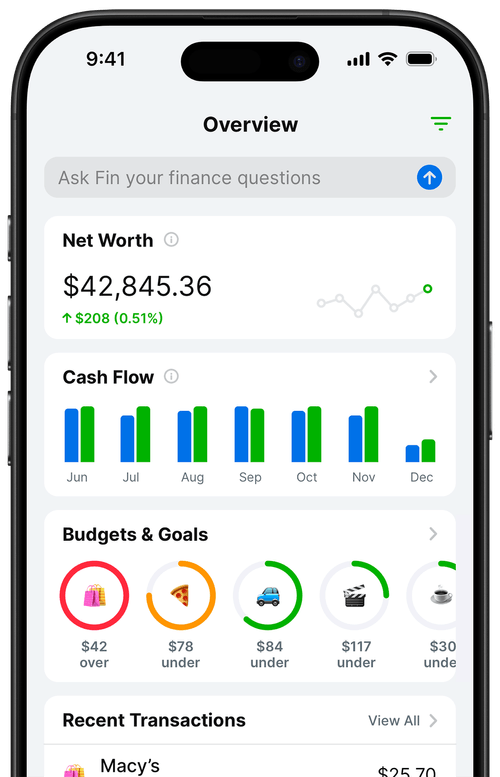
Best expense tracking apps compared
Here is an honest look at the strongest options available right now. I have used or evaluated each of these, and I will be direct about where each one is strong and where it is not the right fit.
| App | Best for | Bank sync | Manual entry | Pricing |
|---|---|---|---|---|
| Balance Pro | Low-friction personal tracking | Yes (Ultra plan) | Yes (all plans) | From $47.99/yr |
| YNAB | Zero-based budgeting | Yes | Yes | $109/yr |
| Monarch Money | Couples and households | Yes | Yes | $99.99/yr |
| Copilot | Apple-ecosystem users | Yes | Limited | $95.99/yr |
| Expensify | Business expense reporting | Yes | Yes | Per user/month |
YNAB (You Need a Budget)
YNAB is the most rigorous personal finance app available for people who want to do zero-based budgeting, which means assigning every dollar you earn to a specific job before you spend it. The methodology is well-designed and genuinely effective for people who stick with it. The learning curve is real: most new users take two to three weeks before the system clicks. If you bounce off YNAB in the first month, it does not mean budgeting is not for you. It might mean zero-based budgeting specifically is not the approach you will maintain.
Monarch Money
Monarch Money is strong for households where two people need to see the same financial picture. The shared account access and collaborative features are well-built, and the net worth tracking is more prominent than in most competitors. For a single person tracking their own spending, Monarch is capable but has more overhead than necessary. The pricing sits at the higher end of the category.
Copilot
Copilot is an iOS and Mac app that has built a devoted following based on its design quality and transaction categorization accuracy. If you are entirely in the Apple ecosystem and want an app that feels native and polished, Copilot is worth considering. It is not available on Android, which rules it out for a large portion of users. Manual entry is possible but not the app's primary flow.
Expensify
Expensify is built primarily for business expense reporting: employees submitting receipts for reimbursement, approval workflows, and accounting software integration. If you are a freelancer who needs to track client-billable expenses and generate reports for clients, it is worth evaluating. For everyday personal spending tracking, it is more app than most people need, and the per-user pricing model makes less sense for individuals than household subscriptions.
Who each app suits best
Choosing an expense tracking app is not really about finding the "best" one in the abstract. It is about finding the one that fits how you actually behave with money.
If you want to learn zero-based budgeting and are willing to invest time in the methodology: YNAB is the right choice. Give it a full month before evaluating whether it is working.
If you manage finances jointly with a partner: Monarch Money's shared account model is the strongest in the category. The collaborative design is purpose-built for that use case.
If you are an iPhone and Mac user who prioritizes design and automated categorization: Copilot is the most polished option in the Apple ecosystem.
If you are a freelancer or contractor who needs to report expenses to clients: Expensify handles approval workflows and accounting integrations that personal finance apps do not.
If you want something low-friction that you can set up in under 15 minutes, works without a bank connection, and gives you a clear category view of your spending without requiring you to learn a new methodology: that is the space I built Balance Pro for. It is straightforward, available on iOS, Android, and web, and the manual entry workflow is fast enough that most people actually use it daily.
One thing I have noticed in ten-plus years of thinking about personal finance tools: the people who improve their financial habits are not the ones who find the most sophisticated app. They are the ones who open their app consistently and actually look at what they spent. Habit beats features every time.
Frequently Asked Questions
What is the best expense tracking app for beginners?
For beginners, the best expense tracking app is one you will actually use consistently. Apps that allow manual entry alongside optional bank sync tend to work well because they give you control over what you track. The most important feature is clear category breakdowns so you can see your spending patterns without having to do mental math.
Do I need to connect my bank account to track expenses?
No. Many expense tracking apps work perfectly well with manual entry. Bank sync is convenient but optional. Some people prefer manual entry for privacy reasons, and others find that the habit of deliberately logging a purchase creates spending awareness that automatic import does not.
How is an expense tracking app different from a budgeting app?
Expense tracking records what you spend. Budgeting sets targets for what you plan to spend. The best personal finance apps do both: they capture your transactions and compare them against category limits you set. Tracking alone tells you the story of your money. Budgeting lets you change the story.
What should I look for in an expense tracking app?
Look for clear category-based spending views, the ability to work with or without bank sync, recurring transaction detection, and a review workflow that makes weekly check-ins easy. Avoid apps that require complex setup before you can log a single transaction.
Are expense tracking apps worth the cost?
Yes, if you use them. An app that helps you identify spending patterns you weren't aware of can surface savings that far exceed the subscription cost. The real cost of not tracking is almost always larger than the cost of the tool itself.
The bottom line on expense tracking apps
The best expense tracking app is the one that fits your habits, not the one with the longest feature list. If you want zero-based budgeting with a full methodology, YNAB is worth the learning curve. If you track finances with a partner, Monarch Money's shared model is well-designed. For Apple-only users who want polish, Copilot delivers. For business expense reporting, Expensify is the right category entirely.
If what you want is a personal finance app that you can set up in under 15 minutes, works with or without bank sync, and makes it easy to see your spending by category every week, those are exactly the problems I built Balance Pro to solve.
For related reading, see how to build a budget that actually works and how to track your spending without going crazy.