

Key takeaways
- The best budgeting app for tracking spending is the one that matches how you actually want to manage money, not the one with the most features.
- YNAB is the most thorough zero-based budgeting tool, but it costs more and demands more from you upfront.
- Envelope-style apps like Goodbudget and EveryDollar work well for people who prefer a structured spending plan by category.
- If privacy matters and you don't want to connect your bank account, look for an app that supports full manual entry.
- Most quality budgeting apps cost between $35 and $100 per year. The free ones usually have meaningful limitations or monetize your data.
If you've ever typed "best budgeting app" into a search engine and come back with a list of ten apps, all described in the same glowing terms, you know how little that helps. The honest answer is that there is no universally best budgeting app for tracking spending. The right app depends on how you think about money, how much friction you're willing to accept, and whether you're comfortable connecting your bank account to a third-party service.
I've been building and using personal finance tools since 2014, so I have opinions about what these apps actually do well and where they fail people. This comparison covers the apps I think are worth your time, along with honest assessments of who each one is built for.
What should you look for in a budgeting app for tracking spending?
Before comparing specific apps, it helps to know what you actually need. A budgeting app for tracking spending should give you a clear answer to one question at any point in the month: how much have I spent, and in what categories? Everything else, investment tracking, net worth dashboards, credit score monitoring, is secondary to that core function.
A few criteria worth evaluating before you commit to anything:
- Bank sync vs. manual entry: Automatic transaction import is faster but requires handing your login credentials (or read-only access via a data aggregator like Plaid) to a third party. Manual entry is slower but keeps your financial data off external servers.
- Budgeting method: Zero-based budgeting (YNAB's approach) assigns every dollar a job before you spend it. Category-target budgeting lets you set monthly limits and track against them as you go. Envelope budgeting is a physical-world metaphor translated into digital categories.
- Platform availability: If you switch between iPhone and Android, or want web access alongside a mobile app, check before you pay.
- Learning curve: Some apps require an initial setup session of an hour or more. Others are usable within 15 minutes. Neither is inherently better, but they suit different people.
- Price and billing model: Annual pricing is almost always cheaper than monthly. Be skeptical of apps with a free plan that seems unusually full-featured; the business model is usually your data.
Which budgeting apps are best for zero-based budgeting?
Zero-based budgeting means you assign a destination to every dollar you earn before you spend any of it. At the start of the month, you divide your income across categories: rent, groceries, dining, savings, debt payoff, and so on, until the balance reads zero. It's a disciplined method that forces you to make deliberate tradeoffs instead of spending reactively and tallying the damage later.
YNAB (You Need a Budget)
YNAB is the category leader for zero-based budgeting, and I want to be honest about that even though I compete with it. The app is built from the ground up around the methodology: it won't let you ignore unbudgeted dollars, it tracks "age of money" (how long your cash sits before you spend it), and it has a large community of users who share category structures and strategies. If zero-based budgeting is the method you want to use, YNAB is the most thorough implementation of it.
The drawbacks are real, though. YNAB costs around $109 per year, which is at the high end for this category. The learning curve is steeper than the marketing suggests; most new users need a few weeks of active use before the workflow clicks. And if you've never budgeted this way before, the initial setup, categorizing every dollar of current income against every expected expense, can feel daunting.
EveryDollar
EveryDollar is Ramsey Solutions' zero-based budgeting app. It takes a slightly more streamlined approach than YNAB, which lowers the barrier to entry. The free version requires manual transaction entry. The premium tier (part of Ramsey+, priced at $79.99/year) adds bank sync and more detailed reporting.
EveryDollar is a reasonable alternative if YNAB's pricing feels steep and you're already aligned with the Dave Ramsey financial philosophy. If you're not, the messaging embedded throughout the app may feel intrusive.
Which budgeting apps work best with the envelope method?
Envelope budgeting is a variant of zero-based budgeting with a physical-world origin: you put cash into labeled envelopes at the start of the month, and when an envelope is empty, spending in that category stops. Digital envelope apps replicate this with virtual envelopes instead of paper ones.
Goodbudget
Goodbudget is the most direct digital translation of the envelope method. You create envelopes for each spending category, fund them at the start of the month, and record transactions against them as you go. The app doesn't connect to your bank; everything is entered manually, which is either a feature or a limitation depending on how you feel about bank sync.
The free plan supports 10 envelopes and one account, which is workable for simple budgets. The paid plan at $10/month (or $80/year) removes those limits. Goodbudget also syncs across multiple devices, which makes it a practical option for couples who want to share envelope access without sharing bank credentials.
Which budgeting apps are best for straightforward spending tracking?
Not everyone wants to assign every dollar a job before spending it. A large portion of people who use budgeting apps want something simpler: connect their accounts, see their transactions categorized, understand where their money is going, and set some targets to stay accountable. This is a legitimate and effective approach to budgeting, and several apps serve it well.
PocketGuard
PocketGuard connects to your bank accounts and calculates a "safe to spend" number after accounting for bills, savings contributions, and spending in each category. It's a useful mental frame for people who want a quick daily check rather than a detailed monthly budget review. The free tier has limitations on custom categories and detailed reporting; the premium plan runs $12.99/month or $74.99/year.
Copilot
Copilot is an iOS-only app that leans heavily on clean design and automatic categorization. It imports transactions from connected accounts, learns your spending patterns over time, and surfaces insights in a dashboard that's genuinely pleasant to look at. At $13/month or $95/year, it's priced toward users who want a polished experience and don't mind paying for it. The limitation is platform: if you're on Android, it's not an option.
Monarch Money
Monarch Money positions itself as a household finance tool, with strong support for tracking across multiple accounts and multiple people. Net worth tracking is a core feature alongside budgeting. At $14.99/month (or $99.99/year), it's competitive with YNAB on price. The interface is clean, bank sync is reliable, and the reporting is more detailed than most apps in this category. For a deeper look at how it compares with YNAB, Rocket Money, and Copilot, I wrote a detailed comparison of all four from the perspective of someone who builds a competing app.
Which budgeting apps for tracking spending let you track without connecting your bank?
Bank sync is convenient, but it comes with real tradeoffs. To import your transactions automatically, you hand your credentials (or read-only access tokens) to a third-party data aggregator. Those aggregators have their own privacy policies, their own security postures, and their own business incentives, which may include selling anonymized or aggregated data. For many people, that's an acceptable tradeoff. For others, it isn't.
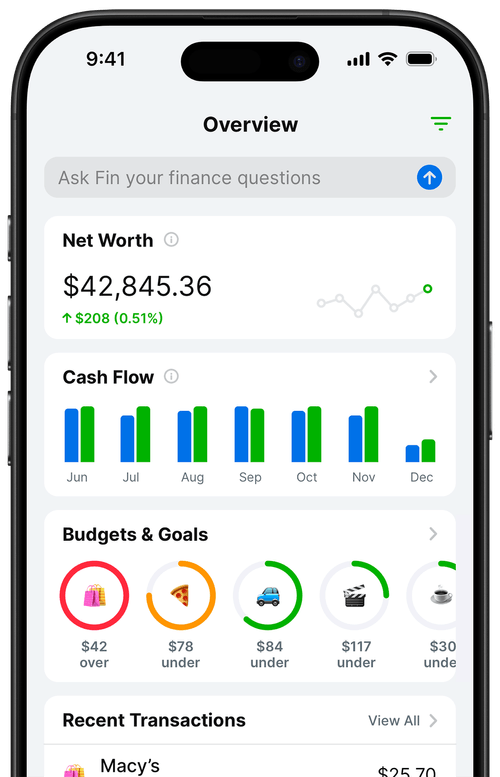
If you want full manual control, the options narrow significantly. Goodbudget (mentioned above) is the most established manual-entry app. EveryDollar's free plan is manual entry only. And Balance Pro supports both modes: you can connect accounts if you want automatic import, or track every transaction by hand if you'd rather keep your data local.
Manual entry has a side benefit beyond privacy: it forces you to actively engage with each transaction. There's no autopilot. You see every purchase as you record it, which tends to build better spending awareness over time. The friction is intentional, and many people who've tried both approaches prefer it once they get into the rhythm.
Which budgeting app works best for couples tracking shared spending?
Couples budgeting has a specific set of requirements: both people need to be able to view and update the same data, ideally in real time. Most apps handle this awkwardly, either by sharing login credentials (a security issue) or by offering multi-user access as a premium feature.
Goodbudget handles this reasonably well because its envelope model translates naturally to shared category management. Both partners can record transactions against the same envelopes from separate devices. Monarch Money also supports shared household tracking with multiple connected accounts.
If you and your partner have very different financial styles, one of you prefers detailed review and the other wants minimal involvement, the envelope method tends to work better than zero-based budgeting because it's easier to delegate ("you handle the grocery envelope, I'll handle utilities") without requiring both people to be equally engaged with the full picture.
How do these budgeting apps compare on price?
| App | Annual price | Bank sync | Manual entry | Best for |
|---|---|---|---|---|
| YNAB | ~$109/yr | Yes | Yes | Zero-based budgeting, serious practitioners |
| Monarch Money | $99.99/yr | Yes | Yes | Households, net worth tracking |
| Copilot | ~$95/yr | Yes | Limited | iOS users who want polished design |
| PocketGuard | $74.99/yr | Yes | Yes | Quick daily spending check |
| EveryDollar | $79.99/yr (Ramsey+) | Premium only | Yes (free tier) | Zero-based budgeting, Ramsey followers |
| Goodbudget | $80/yr | No | Yes | Envelope method, couples, privacy |
| Balance Pro Premium | $47.99/yr | No (manual) | Yes | Simple category tracking, privacy-first |
| Balance Pro Ultra | $99.99/yr | Yes | Yes | Automatic import + manual flexibility |
A few observations from the pricing above. First, there's no meaningful free tier in this category worth recommending. Empower (formerly Personal Capital) is free, and it's useful for net worth tracking, but its budgeting features are secondary to its wealth management product. Most free budgeting apps are either limited enough to frustrate you into upgrading or monetized through data practices that aren't fully transparent.
Second, annual pricing beats monthly pricing by a wide margin across every app listed here. If you're planning to use any of these tools for longer than two months, pay annually.
Third, the right app is not necessarily the most expensive one. YNAB's price reflects a specific methodology and a large support community. If you don't need zero-based budgeting, paying $109/year for it doesn't make sense. Pick the app that matches your actual behavior and budget method, not the one with the longest feature list.
Frequently Asked Questions
What is the best budgeting app for tracking spending?
It depends on your method. For zero-based budgeting with bank sync, YNAB is the most thorough. For privacy-focused manual tracking, Balance Pro or Goodbudget are strong options. For couples managing shared accounts, Monarch Money and Goodbudget both work well. The best app is the one that fits how you actually think about money.
Is there a free budgeting app that actually works?
Empower (formerly Personal Capital) offers a free budgeting and net worth tracker, though budgeting is not its primary focus. Goodbudget has a free tier with 10 envelopes. Most serious budgeting apps charge a subscription, because the free business model usually relies on selling aggregated data or aggressively pushing premium upgrades.
What is the difference between YNAB and simpler budgeting apps?
YNAB requires you to assign every dollar to a category before spending it (zero-based budgeting). Simpler apps let you track spending after the fact and compare it against monthly targets. YNAB demands more initial setup and ongoing engagement. Simpler trackers work better for people who want periodic review rather than active monthly planning.
Do budgeting apps share your bank data?
Apps that connect to your bank use third-party aggregators like Plaid or Finicity, each with their own privacy policies and data-sharing terms. Read those policies before connecting. If you'd rather not share that data at all, choose an app that supports full manual entry, such as Goodbudget or Balance Pro's manual mode.
How much should I expect to pay for a good budgeting app?
Most quality budgeting apps cost between $48 and $110 per year. YNAB is at the high end at around $109/year. Balance Pro Premium is at $47.99/year. Paying annually is almost always cheaper than month-to-month. Avoid apps priced at zero unless you've read the privacy policy carefully and understand how the company makes money.
Can I switch budgeting apps without losing my data?
Most apps allow CSV export of your transaction history, so you can retain your data before switching. Check whether the app you're leaving supports CSV export before you cancel. Some apps make this easy; others bury the export option. It's worth exporting a copy of your data periodically regardless of whether you plan to switch.